Every year, thousands of students apply to study at the University of Johannesburg (UJ). After submitting your application, the most important step is knowing whether you have been accepted. This is where the UJ Status Check 2026 process comes in. Using the official UJ status check portal, applicants can confirm their admission outcome, view communication from the university, and monitor updates in real time.
The UJ application status check is available online through the UJ student portal and is designed to give you quick and secure access. Whether you want to check your status using your ID number, your student number, or your contact details, the system allows you to do so in a few easy steps.
You can check your application outcome here: UJ Status Check Portal
@nellysfundi @nellysfundi here are the steps of how to add the additional course ar UJ #UJ #application #university ♬ original sound – Yano Lyrics
How the UJ Status Check Portal Works
The UJ status check portal is the official platform for tracking admission progress. Once you log in, you can:
- Verify if your UJ online application was received.
- Confirm your admission status for 2026.
- Access important communication from the university.
- Ensure your personal details are correct for future correspondence.
The system is powered by the UJ status check enabler, which securely verifies your identity before showing your results.
Step-by-Step Guide to UJ Status Check 2026
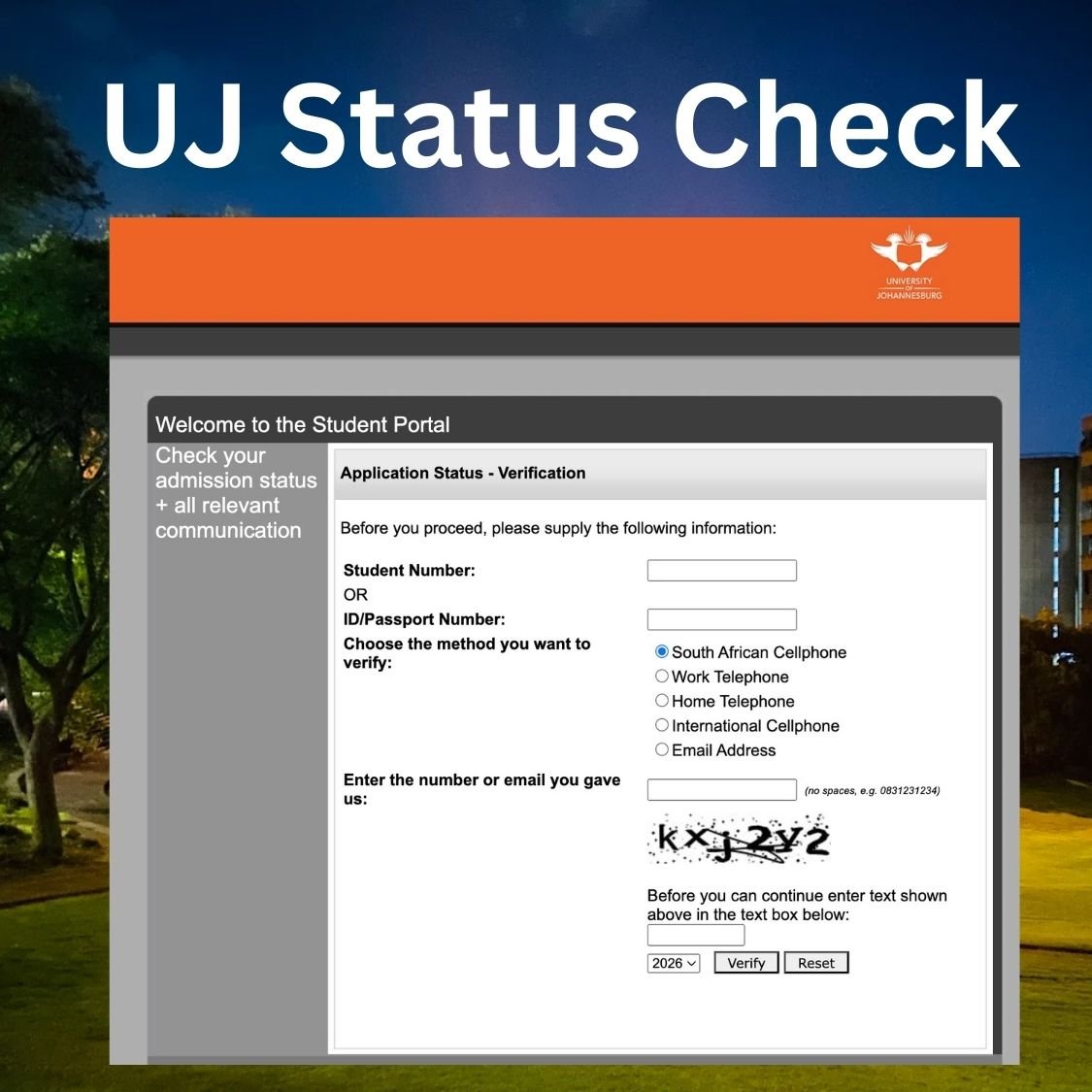
To perform your UJ online application status check, follow these steps:
- Go to the official portal: https://student.uj.ac.za/status
- Enter your Student Number or ID/Passport Number.
- Choose a verification method:
- South African Cellphone
- Work Telephone
- Home Telephone
- International Cellphone
- Email Address
- Type in the number or email address you provided during your application.
- Enter the security text (CAPTCHA) displayed on the page.
- Click Verify to view your status.
If the information you enter matches the university’s records, your UJ admission status will be displayed immediately.
UJ Status Check Using ID Number
Many applicants prefer to check their application progress using their South African ID number. The UJ status check using ID number option is available on the portal. Simply enter your ID number in the verification field and complete the process. This is especially helpful if you misplaced your UJ student number or have not yet received one.
UJ Application Status – What the Results Mean
When you complete the UJ student portal status check, your result may fall into one of the following categories:
- Accepted/Provisionally Accepted – You have been offered a place in your chosen course.
- Pending – Your application is still under review. Additional documents may be required.
- Declined – Unfortunately, your application was not successful.
- Waitlisted – You may be offered a place if space becomes available.
Always ensure you read the communication linked to your status, as UJ often provides next steps or deadlines for uploading documents.
UJ Status Check Contact Details
If you experience problems with the UJ application status check, you can contact the university for assistance. The official UJ status check contact details are:
- UJ Call Centre: 011 559 4555
- Email: mylife@uj.ac.za
- UJ Website: www.uj.ac.za
Support staff can assist you if your login details do not work or if the portal shows errors.
Why the UJ Online Application Status Check is Important
The UJ online application status check is the only official way to confirm if you have been admitted. Since spaces at UJ are limited, keeping track of your status ensures you do not miss deadlines for:
- Accepting your admission offer.
- Uploading outstanding documents.
- Registering for your chosen course.
Students who check their status regularly are better prepared for registration and avoid last-minute problems.
UJ Check Status 2026 – Final Notes
If you applied to the University of Johannesburg, doing a UJ check status 2026 through the official portal is essential. Whether you use your student number, ID number, or contact details, the portal will display your admission outcome and guide you on the next steps.
For all applicants wondering how to track progress, the answer is simple: use the UJ status check portal at https://student.uj.ac.za/status.
When searching for “UJ application status check”, “UJ status check enabler”, or “UJ student portal status check”, remember that the process is secure, quick, and fully online.
By keeping a close eye on your admission results, you can ensure you are fully prepared for your academic journey at UJ in 2026.
Frequently Asked Questions About UJ Status Check 2026
When does UJ respond to applications?
The University of Johannesburg usually begins responding to applications within 4 to 6 weeks after submission. However, final responses often depend on when you applied. Early applicants may receive feedback sooner, while those who apply closer to the deadline may need to wait until after final matric results are released in January. You can track updates anytime using the official UJ status check portal.
How do I check my UJ application status?
You can check your UJ application status by visiting the official portal at https://student.uj.ac.za/status. Enter your student number or ID number, select a verification method, and click Verify. The system will display your UJ admission status and any relevant communication from the university.
Can I do a UJ status check without a student number?
Yes. The UJ status check using ID number option allows you to log in without a student number. Simply provide your South African ID number or passport number, along with the contact details you used during application.
What does “Pending” mean on UJ status check?
If your UJ student portal status check shows “Pending”, it means your application is still under review. The university may be waiting for additional documents, exam results, or for the selection committee to finalise decisions. Keep checking your status regularly to see when it changes.
What if my UJ status check says “Provisionally Accepted”?
A “Provisionally Accepted” status means you have been offered a place on condition that you meet the final admission requirements, such as passing Grade 12 with the required APS. Once your final results are released, UJ will update your status to fully accepted if you qualify.
What should I do if my UJ status check shows “Declined”?
If your application is declined, it means you did not meet the minimum admission requirements or space was not available in your chosen programme. You may still apply for another course with available space or consider UJ’s late application opportunities, if open.
Can I check my UJ application status on my phone?
Yes. The UJ online application status check is mobile-friendly. You can log in using your phone browser, enter your details, and view your admission status without needing a computer.
How do I contact UJ if I have issues with my status check?
If you cannot access your application details or the portal shows an error, you can use the official UJ status check contact details:
- Call Centre: 011 559 4555
- Email: mylife@uj.ac.za
- Website: www.uj.ac.za
Get Free Help for Your Assignment Today
Click the Button Below: